Some stores need to control which payment methods show up depending on what’s in the cart. A common example: disabling Cash on Delivery for high-value or digital products, or hiding a specific gateway for a category that requires manual invoicing instead. WooCommerce doesn’t offer this out of the box but a small snippet handles it without needing a paid plugin.
Here are two ways to set it up, depending on whether you want a quick fix or something you can adjust later without touching code.
Method 1: Hardcoded (Fastest to Set Up)
This version disables a specific gateway whenever a specific category is present in the cart. You set the category ID and gateway ID directly in the code.
/**
 * Disable a payment gateway when a specific product category is in the cart.
 */
add_filter( 'woocommerce_available_payment_gateways', 'wpcodex_disable_gateway_by_category' );
function wpcodex_disable_gateway_by_category( $available_gateways ) {

    if ( is_admin() || ! WC()->cart ) {
        return $available_gateways;
    }

    $target_category_id = 58;     // Change this to your category ID
    $gateway_to_disable  = 'cod';  // Change this to the gateway ID you want to hide

    $category_in_cart = false;

    foreach ( WC()->cart->get_cart() as $cart_item ) {
        if ( has_term( $target_category_id, 'product_cat', $cart_item['product_id'] ) ) {
            $category_in_cart = true;
            break;
        }
    }

    if ( $category_in_cart && isset( $available_gateways[ $gateway_to_disable ] ) ) {
        unset( $available_gateways[ $gateway_to_disable ] );
    }

    return $available_gateways;
}
Finding your category ID: go to Products → Categories, hover over the category name, and check the URL it will show tag_ID=XX.
Common gateway IDs: cod (Cash on Delivery), bacs (Direct Bank Transfer), cheque, paypal, stripe.
Use this when you only need to manage one category/gateway pair and don’t expect it to change.
Method 2: Configurable via WooCommerce Settings (No Hardcoding)
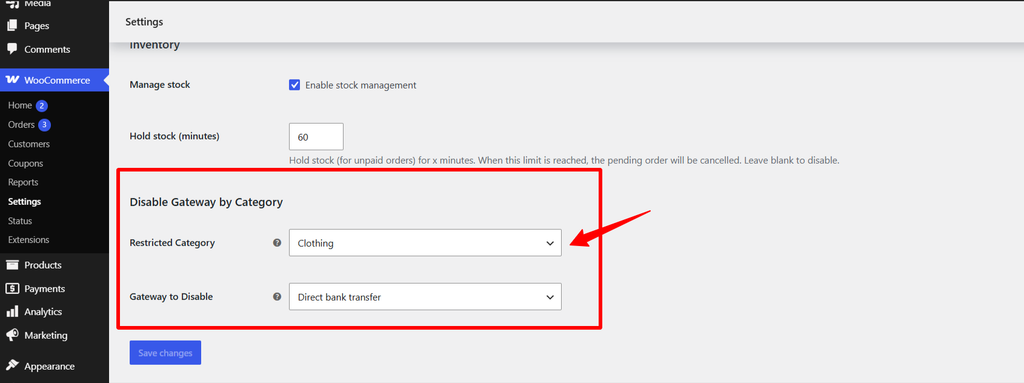
This version lets you pick the category and gateway from dropdowns in WooCommerce settings, instead of editing code every time you want to change them.
Step 1 – Add the settings fields
/**
 * Add "Restricted Category" and "Gateway to Disable" fields
 * to WooCommerce > Settings > Products > Inventory.
 */
add_filter( 'woocommerce_inventory_settings', 'wpcodex_add_gateway_category_settings' );
function wpcodex_add_gateway_category_settings( $settings ) {

    $categories = get_terms( array( 'taxonomy' => 'product_cat', 'hide_empty' => false ) );
    $category_options = array( '' => __( 'None', 'woocommerce' ) );
    foreach ( $categories as $cat ) {
        $category_options[ $cat->term_id ] = $cat->name;
    }

    $gateways = WC()->payment_gateways->payment_gateways();
    $gateway_options = array( '' => __( 'None', 'woocommerce' ) );
    foreach ( $gateways as $id => $gateway ) {
        $gateway_options[ $id ] = $gateway->get_method_title();
    }

    $settings[] = array(
        'title' => __( 'Disable Gateway by Category', 'woocommerce' ),
        'type'  => 'title',
        'id'    => 'wpcodex_gateway_category_settings',
    );

    $settings[] = array(
        'title'    => __( 'Restricted Category', 'woocommerce' ),
        'desc'     => __( 'Select the product category that should disable a payment gateway.', 'woocommerce' ),
        'id'       => 'wpcodex_restricted_category',
        'type'     => 'select',
        'options'  => $category_options,
        'desc_tip' => true,
    );

    $settings[] = array(
        'title'    => __( 'Gateway to Disable', 'woocommerce' ),
        'desc'     => __( 'Select the payment gateway to hide when the category above is in the cart.', 'woocommerce' ),
        'id'       => 'wpcodex_gateway_to_disable',
        'type'     => 'select',
        'options'  => $gateway_options,
        'desc_tip' => true,
    );

    $settings[] = array(
        'type' => 'sectionend',
        'id'   => 'wpcodex_gateway_category_settings',
    );

    return $settings;
}
Step 2 – Use the saved settings in the actual logic
/**
 * Disable the selected gateway when the selected category is in the cart.
 */
add_filter( 'woocommerce_available_payment_gateways', 'wpcodex_disable_gateway_by_category_dynamic' );
function wpcodex_disable_gateway_by_category_dynamic( $available_gateways ) {

    if ( is_admin() || ! WC()->cart ) {
        return $available_gateways;
    }

    $target_category_id = get_option( 'wpcodex_restricted_category' );
    $gateway_to_disable  = get_option( 'wpcodex_gateway_to_disable' );

    if ( empty( $target_category_id ) || empty( $gateway_to_disable ) ) {
        return $available_gateways;
    }

    $category_in_cart = false;

    foreach ( WC()->cart->get_cart() as $cart_item ) {
        if ( has_term( (int) $target_category_id, 'product_cat', $cart_item['product_id'] ) ) {
            $category_in_cart = true;
            break;
        }
    }

    if ( $category_in_cart && isset( $available_gateways[ $gateway_to_disable ] ) ) {
        unset( $available_gateways[ $gateway_to_disable ] );
    }

    return $available_gateways;
}
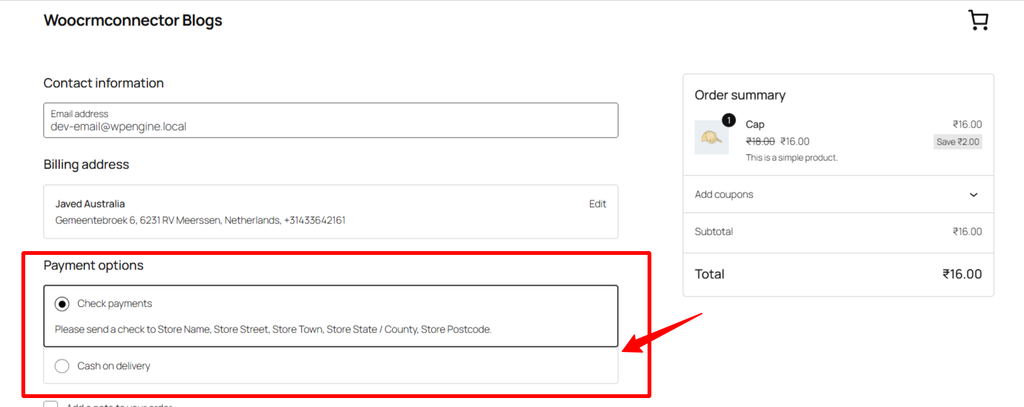
Add both parts together (not alongside Method 1 this replaces it). Once active, go to WooCommerce → Settings → Products → Inventory and you’ll see two new fields at the bottom: “Restricted Category” and “Gateway to Disable.”
Why the Inventory tab, not Payments? In recent WooCommerce versions, the Payments settings tab has been partly rebuilt with a React-based interface for the newer payments onboarding flow. Classic settings fields registered there don’t reliably render with a working Save button. The Inventory tab still uses the classic Settings API, so the fields save correctly.
Where to Add This Code
Pick one method (not both), and add it to:
- Your child theme’s
functions.php, or - A site-specific plugin (recommended it survives theme updates), or
- A code snippets plugin like WPCode or Code Snippets
Troubleshooting
The gateway doesn’t disappear immediately when I add the restricted product. If your store uses the newer block-based checkout (Cart & Checkout blocks instead of the classic shortcode), the gateway list is rendered client-side and can lag slightly behind a cart change. It should update once the cart totals refresh. If it never updates, confirm you’re using the classic checkout shortcode, since gateway filtering via woocommerce_available_payment_gateways is most reliable there.
Can I disable more than one gateway for the same category? Yes in Method 1, change the unset() line to loop through an array of gateway IDs instead of a single string. In Method 2, you’d need to change the settings field from a single-select dropdown to a multi-select.
Does this affect the My Account “Pay for Order” page too? No, both snippets only run on the checkout page by default. If you need the same restriction there, you’d need to remove the is_checkout()-style check and confirm the cart contents are still accessible in that context.
“This is the same approach we used in limiting the WooCommerce cart to one product — the Inventory tab reliably supports custom settings fields, while some other tabs don’t.”
FAQ
Will this work if a customer has products from multiple categories in their cart? Yes. The snippet checks every item in the cart, so as long as the restricted category is present anywhere in the cart, the gateway will be disabled→ Inventory via woocommerce_inventory_settings even if other unrelated products are also in there.
Does this stop the customer from checking out entirely, or just hide one payment option? Just the one option. The customer can still complete their order using any other available payment gateway; this only removes the specific one you’ve targeted.