If you run a WordPress agency, hosting isn’t really about “keeping a site online” anymore. It’s about how many client sites you can safely manage with a small team, how fast you can onboard a new project without another 2 a.m. migration, and whether your client sees your brand or someone else’s login screen. Pick the wrong host and every one of those problems multiplies with each new client you sign.
I put together this guide after digging through what agencies are actually running in 2026 – not just marketing pages, but the plan limits, the white-label tools, and the pricing traps that only show up once you’re managing more than a handful of sites. Below is a practical breakdown of the hosts worth your time, who each one actually fits, and where the fine print bites.
What Actually Matters When You’re Hosting for Clients (Not Yourself)
Before the list, it’s worth being clear on what “agency-ready” hosting means, because it’s a different checklist than personal-blog hosting.
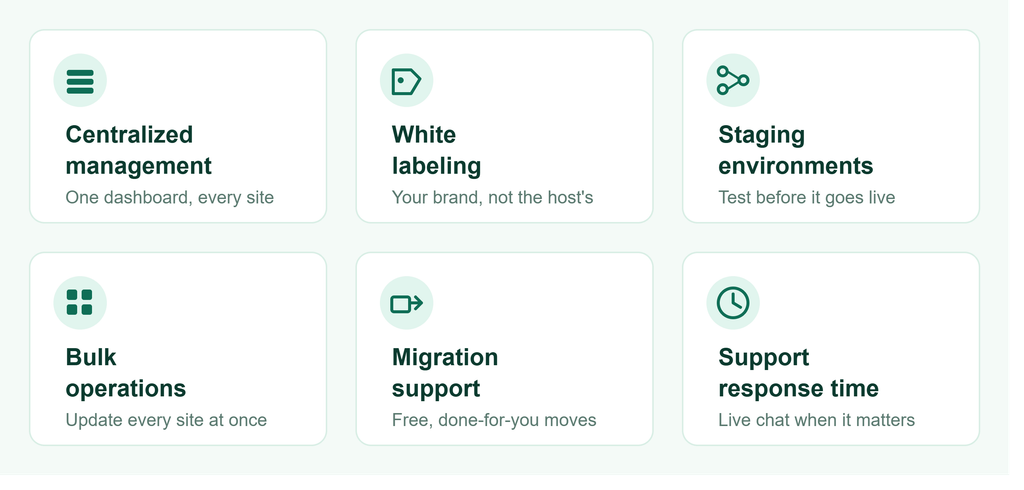
- Centralized management. You want one dashboard to clone, stage, update, and monitor every client site not 30 separate logins.
- White-labeling. Clients should see your agency’s name on invoices and dashboards, not your host’s branding. This is what turns hosting into a recurring revenue line instead of a pass-through cost.
- Staging and dev environments. Pushing plugin updates straight to production across dozens of client sites is how agencies end up doing emergency phone calls on a Friday night.
- Bulk operations. Updating themes, plugins, and PHP versions one site at a time doesn’t scale past about ten clients.
- Migration support. Free, done-for-you migrations matter enormously when you’re taking over a client’s existing site from another host.
- Support response time. When a client’s checkout page goes down, “we’ll get back to you in 24 hours” isn’t good enough you need live chat with someone who actually knows WordPress.
With that in mind, here’s how the major options stack up.
Quick Comparison
| Host | Best For | Starting Price (Agency Tier) | White-Label | Free Migrations |
|---|---|---|---|---|
| WP Engine | Larger agencies, enterprise clients | ~$96–242/mo (10–30 sites) | Yes, full portal | Yes, bulk |
| Kinsta | Performance-sensitive client sites | ~$115–340/mo (10–20 sites) | Yes, caching + dashboard | Yes, unlimited |
| Cloudways | Lean agencies wanting per-site control | ~$4.60+/site | Partial, via reseller setup | Yes |
| SiteGround | Small-to-mid agencies on a budget | ~$40/mo (GoGeek plan) | Yes, on GoGeek/Cloud | Yes, automated |
| Pressable (Automattic) | Agencies building recurring hosting revenue | Custom, reseller-based | Yes, full reseller | Yes, concierge |
| Flywheel | Design-focused agencies, client handoff | ~$113/mo (Growth Suite) | Yes | Yes |
| Hostinger Pro | New or budget-conscious agencies | Flexible, scales with sites | Limited | Yes |
Pricing shifts often treat these as ballpark figures and confirm current rates before you commit a client budget to any plan.
WP Engine Best for Agencies Managing Enterprise or High-Traffic Clients
WP Engine remains the option agencies reach for once client sites start carrying real business risk. The appeal isn’t just uptime. it’s the full three-environment workflow (dev, staging, production) on every site from the Professional tier up, plus a Smart Plugin Manager that visually checks plugin updates for breakage before they go live across your whole portfolio.
For agencies running client counts in the 10–50 range, the Growth tier covers around 10 sites and 100,000 monthly visits, while the Scale tier moves up to roughly 30 sites and 400,000 visits. Backups are held for 40 days, which is longer than most competitors useful if a client only notices something broke during a monthly review call, not the day it happened.
Where it’s weaker: cost. This isn’t the plan for an agency still building out its first ten clients on tight margins.
Kinsta Best for Performance Critical Client Sites
Kinsta runs on Google Cloud’s premium network tier, and it shows in raw speed benchmarks. Every plan even entry-level ones includes Cloudflare Enterprise, which normally costs extra elsewhere. For agencies, the Agency plans bundle 20+ site installs with a white-label caching plugin, role-based user access, and bulk management through the MyKinsta dashboard.
The catch is that Kinsta bills partly on visits, not just site count, so a client with an unexpected traffic spike (a product launch, a press mention) can push you into overage territory. If your clients’ traffic is unpredictable, budget some slack rather than sizing a plan exactly to current numbers.
Where it’s weaker: no self-managed or cPanel fallback you’re fully inside Kinsta’s environment, which is fine until you need something outside its guardrails.
Cloudways Best for Agencies That Want Per-Site Cost Control
Cloudways takes a different approach: instead of bundled agency tiers, you pay per site on cloud infrastructure (DigitalOcean, Vultr, AWS, or Google Cloud under the hood), which can work out cheaper at scale if your sites have modest traffic. It’s popular with agencies who’d rather size resources per client than pay for a fixed bundle that half their clients don’t use.

The dashboard supports team access, staging, and one-click cloning, which covers most of what a small-to-mid agency needs day to day.
Where it’s weaker: white-labeling isn’t as polished out of the box you’ll spend more setup time making it look seamless for clients compared to hosts built agency-first.
SiteGround Best Budget Option With Real White-Label Tools
SiteGround’s GoGeek and Cloud plans include genuine white-label client access clients get a dashboard with zero SiteGround branding, which is rare at this price point. You also get a proprietary “Site Tools” panel (instead of cPanel), custom PHP configurations for faster load times, and collaborator access for adding team members to individual client sites.
It’s a strong pick for agencies managing a high volume of smaller sites think local business clients where enterprise-grade infrastructure would be overkill.
Where it’s weaker: at real scale (50+ sites), the shared-hosting-style architecture starts to show its limits compared to cloud-native hosts.
Pressable Best for Building a Recurring Hosting Revenue Stream
Pressable, owned by Automattic (the company behind WordPress.com), leans hard into the reseller model meaning your agency effectively becomes the hosting provider from the client’s point of view, with full control over pricing and billing. Migrations are concierge-level, and there are incentives specifically for agencies switching client sites over from another host.

This is the option to look at if your agency’s business model depends on turning one-off project work into monthly recurring revenue, rather than treating hosting as a pass-through expense.
Flywheel Best for Design-Focused Agencies and Client Handoffs
Flywheel’s Growth Suite is built around the agency-to-client handoff moment features like Blueprints (site templates you can reuse across new client builds), automatic billing transfer to the client, and one-click deployment from Local WP make it a favorite among smaller design and dev shops that build a lot of similar sites.
At around $113/month for the Growth Suite, it’s priced for agencies with a steady client pipeline rather than agencies just starting out.
Hostinger Pro Best for New or Budget-Conscious Agencies
Hostinger’s agency-focused tier guarantees 99.9% uptime with flexible resource scaling, and it’s noticeably cheaper to get started with than the managed-hosting-first names above. It won’t out-perform WP Engine or Kinsta on raw speed, but for an agency still proving out its client base, the lower cost of entry buys you room to grow into a pricier plan later.

How to Actually Choose
If you’re still deciding, it usually comes down to three questions:
- How many client sites are you managing right now, and where will that be in a year? Under 10 sites, budget-friendly options like SiteGround or Hostinger Pro make sense. Past 20–30, the bulk-management tools on WP Engine or Kinsta start paying for themselves in saved hours.
- Do your clients care about site speed? E-commerce or lead-gen clients where a slow page costs real conversions justify paying more for Kinsta or WP Engine’s infrastructure.
- Is hosting a cost center or a revenue line for your agency? If you want to resell hosting as part of your monthly retainer, Pressable’s reseller model or Cloudways’ per-site pricing gives you more control over your margins than a fixed agency bundle.
“There isn’t one “best” host here — there’s a best fit for where your agency is right now. The mistake most agencies make is picking the biggest name up front and paying for capacity they won’t use for another two years. Start with what fits your current client list, and make sure whatever you pick has a clear upgrade path so switching later isn’t another migration project of its own. And if you’ve ever dealt with a DNS error mid-migration, you know how much smoother switching goes with a host that handles propagation cleanly.”
Frequently Asked Questions
Is managed WordPress hosting worth it for agencies?
For most agencies past their first few clients, yes the time saved on updates, backups, and migrations tends to be worth more than the price difference versus unmanaged hosting.
Which host is best for managing multiple client sites from one dashboard?
Cloudways, Kinsta, and WP Engine all offer centralized dashboards built for exactly this, letting you clone, stage, and update sites without logging into each one separately.
Can I white-label hosting under my own agency’s brand?
Yes SiteGround (GoGeek/Cloud plans), Kinsta, WP Engine, Flywheel, and Pressable all support some form of white-labeling, though the depth varies from a rebranded dashboard to a full reseller setup where clients never see the underlying host’s name.