
Sync WordPress & WooCommerce Sites Automatically
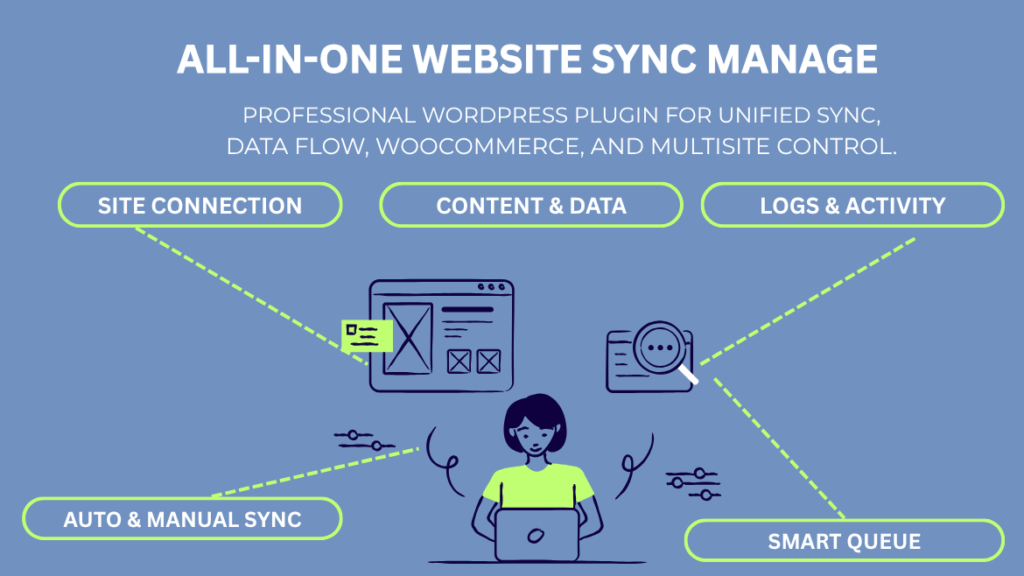
All-in-One Website Sync Manager is a WordPress plugin that synchronizes content, products, media, and users between any number of WordPress websites or WooCommerce stores — automatically, on a schedule, or on demand — from a single admin dashboard.
Whether you manage content across a network of client sites, operate multiple WooCommerce stores, maintain separate staging and live environments, or run a WordPress multisite network, this plugin eliminates the repetitive manual work of copying and updating data between sites. Define your sync connections once, set your rules, and let the plugin handle the rest.

Why Managing Multiple WordPress Sites Without a Sync Tool Wastes Hours Every Week
Anyone who manages more than one WordPress website knows the problem. You publish a new blog post on Site A — now you need to copy it to Sites B, C, and D. You update a WooCommerce product price on your main store — now you need to find and update the same product on every other store. You upload a set of images to one site’s media library — now you need to re-upload them everywhere else.
Multiply that across dozens of client websites, multiple store environments, or an active content network, and the manual effort becomes a significant drain on time and budget.
All-in-One Website Sync Manager solves this with automated, rule-based synchronization that runs in the background — so your team can focus on building and growing rather than copying and pasting.
Key Features
Content Sync — Posts, Pages & Custom Post Types
Synchronize WordPress posts, pages, and custom post types from one website to any connected destination site. Content sync can be triggered automatically when a post is published or updated, run manually for individual items, or executed as a bulk job for entire content archives.
Supported sync options include:
- Auto-sync on publish and on update
- Manual sync for individual posts
- Bulk sync for entire post type archives
- Sync of categories and tags (taxonomy sync)
- Sync of featured images
- Sync of ACF (Advanced Custom Fields) and ACF PRO fields
- Configurable delete behavior: no action, move to trash, or permanently delete
- Exclusion of specific meta fields from sync
- Retry queue for failed sync tasks
- CSV export of all sync logs
Once configured, content published on your source site distributes to all connected destination sites instantly — with no manual intervention required.
WooCommerce Product Sync
Synchronize WooCommerce product catalogs between stores — including product data, pricing, stock levels, categories, tags, images, and variations. Ideal for businesses operating multiple regional stores, a main store plus affiliate or partner stores, or a staging environment that needs to stay current with the live store.
Supported WooCommerce sync features:
- Sync simple, variable, and grouped products
- Sync product categories and tags
- Sync pricing and sale pricing
- Sync stock levels and inventory
- Sync product images and gallery images
- Sync product descriptions and short descriptions
- Auto-sync on product update or price change
- Bulk sync of entire product catalogs
- Configurable conflict resolution (source wins / destination wins)
Managing a multi-store WooCommerce operation manually is one of the most time-consuming tasks in e-commerce operations. With product sync automated, price changes and catalog updates propagate across all your stores simultaneously.
Media Library Sync
Synchronize WordPress media library files — images, documents, videos, and other uploads — between connected sites. Media sync ensures that all sites in your network have access to the same asset library without requiring manual re-upload to each installation.
Media sync features:
- Sync uploaded images and files to connected sites
- Sync image metadata and alt text
- Avoid duplicate uploads with intelligent deduplication
- Bulk media sync for existing library items
- Sync logs to track media transfer activity
For agencies managing client sites that share brand assets, and for content networks that use the same images across multiple properties, media sync eliminates one of the most tedious and error-prone manual tasks.
User & Role Sync
Synchronize WordPress users, user roles, and user meta data between connected sites. User sync is particularly valuable for membership sites, multisite networks, and businesses that maintain separate WordPress installations for different regions or departments but want a unified user base.
User sync capabilities:
- Sync users between separate WordPress installations
- Sync user roles and permissions
- Sync user meta fields
- Bulk user sync for existing user databases
- Selective sync by user role or user group
- Activity logs for all user sync operations
WordPress Multisite Support
WPcodexplugins Build for All-in-One Website Sync Manager is built to work with WordPress multisite networks, giving network administrators tools to synchronize content and data across subsites from the network admin dashboard. Maintain consistency across your entire multisite network without logging into each subsite individually.
Bulk Sync Jobs
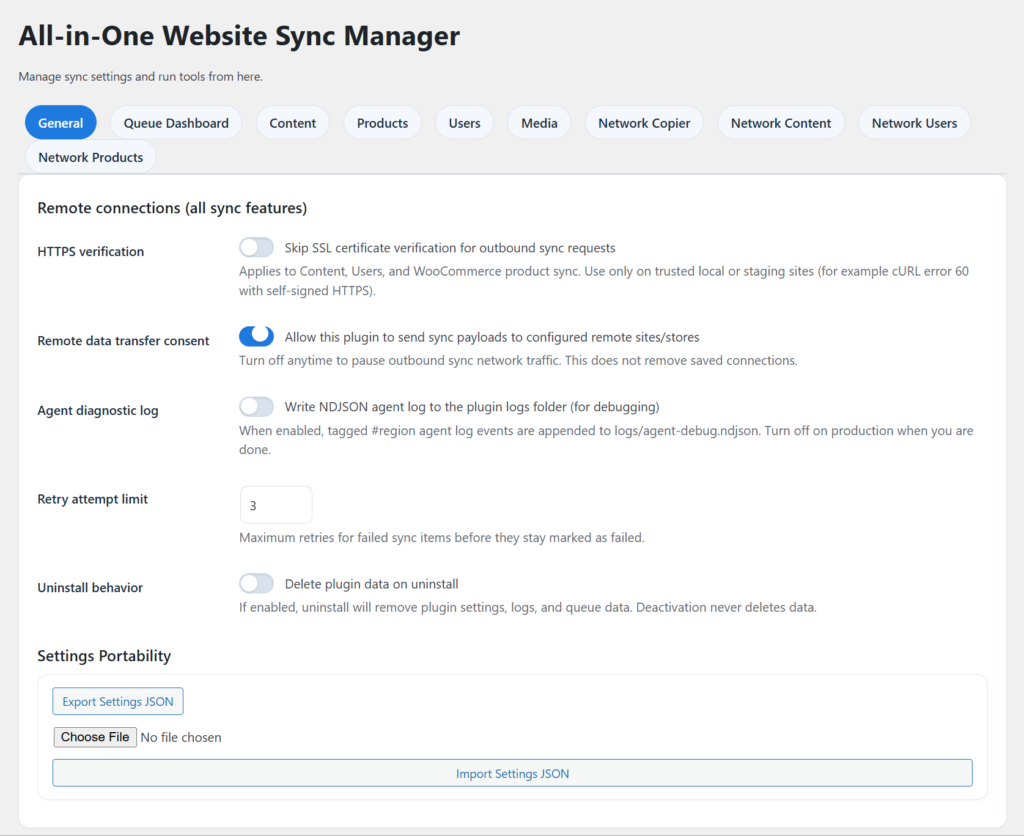
Run large-scale synchronization operations across entire content archives, product catalogs, or media libraries in a single bulk job. Bulk sync jobs run in the background without affecting frontend performance or causing timeouts, and all activity is logged for review.
Bulk job features:
- Queue large sync operations without timeouts
- Background processing to avoid server load spikes
- Progress tracking in the admin dashboard
- Pause and resume bulk jobs
- CSV export of bulk job results
Sync Logs & Reporting
Every sync operation — whether automatic, manual, or bulk — is logged in a detailed activity log accessible from the admin dashboard. Logs include timestamps, sync type, source and destination, items synced, and success or error status.
- Filter logs by sync type, date range, or status
- Export logs to CSV for client reporting or internal audits
- Identify and diagnose failed sync operations
- View retry queue status for failed items
Smart Alert System — Email, Slack & Webhook Notifications
Configure alerts for sync failures, completion of bulk jobs, or any sync event you want to monitor. Notifications can be sent via:
- Email — to any address or team distribution list
- Slack — via Slack webhook integration to any channel
- Webhook — POST request to any external URL for custom automation
REST API & Webhook Support
All-in-One Website Sync Manager exposes REST API endpoints for developers who want to trigger sync operations programmatically or integrate sync data with external systems. Webhook support enables real-time notifications to third-party platforms including Zapier, Make (Integromat), and custom backend services.
Role-Based Access Control
Assign specific WordPress user roles permission to view sync dashboards, manage sync connections, or run sync jobs — without granting full admin access. Ideal for agencies where account managers or clients need visibility into sync activity without access to plugin configuration.
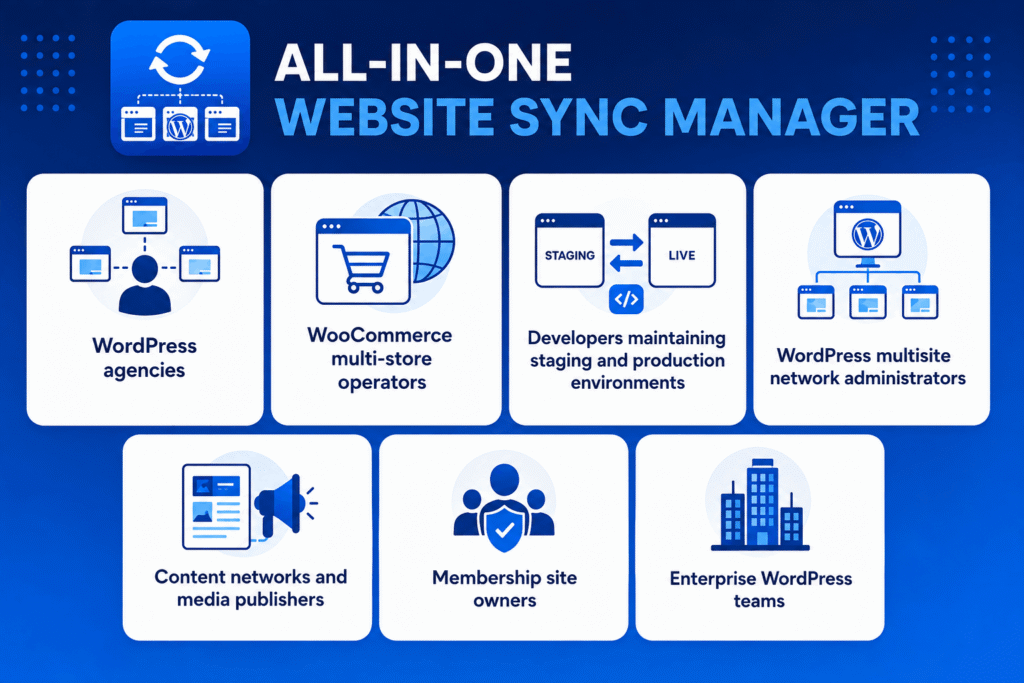
Who Is All-in-One Website Sync Manager For?
- WordPress agencies managing 5, 10, or 50+ client websites who need to distribute content updates, theme changes, or media assets across multiple sites efficiently without manual repetition
- WooCommerce multi-store operators running regional stores, franchise stores, or a main store plus partner stores who need product catalogs and pricing synchronized automatically
- Developers maintaining staging and production environments who need to push content from staging to live, or pull live content into staging for testing, without manual database exports and imports
- WordPress multisite network administrators who manage multiple subsites on a network and need content and user data synchronized across the network
- Content networks and media publishers operating multiple WordPress sites covering different topics or regions that publish shared content across all properties
- Membership site owners who maintain user accounts across multiple WordPress installations and need user data kept consistent
- Enterprise WordPress teams handling large-scale content operations where manual data management is operationally unsustainable
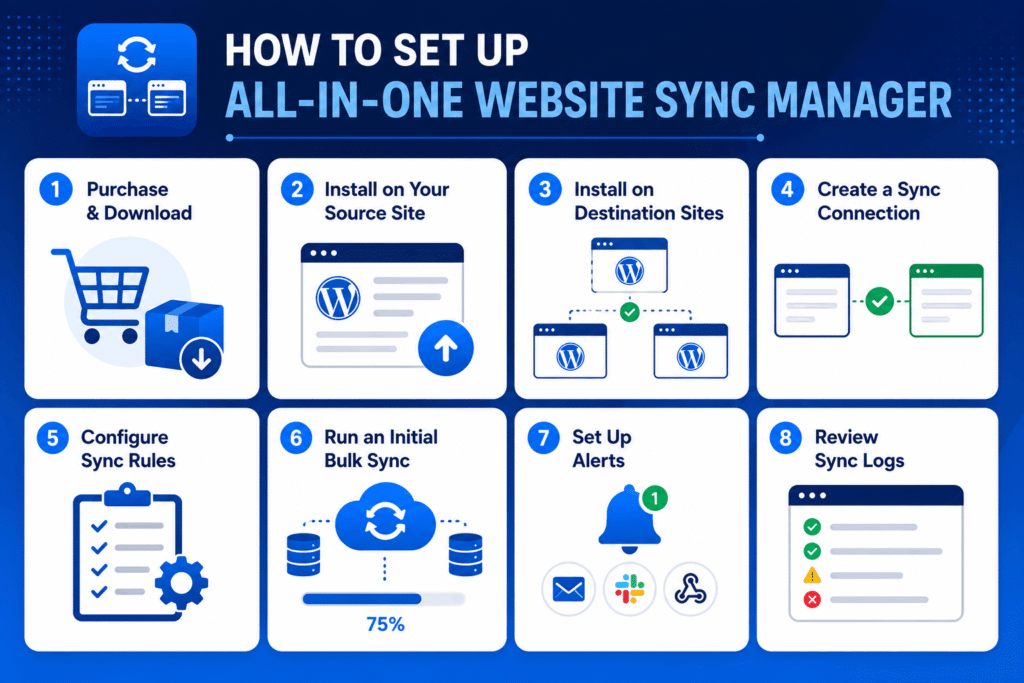
How to Set Up All-in-One Website Sync Manager
Step 1 — Purchase & Download
After purchasing All-in-One Website Sync Manager for $49, you will receive a download link via email. The plugin is delivered as a .zip file.
Step 2 — Install on Your Source Site
Go to WordPress Admin → Plugins → Add New → Upload Plugin. Upload the .zip file, click Install Now, then Activate. The source site is the site you will sync content FROM.
Step 3 — Install on Destination Sites
Install and activate the plugin on every WordPress site you want to sync TO. Each destination site needs the plugin active to receive sync connections.
Step 4 — Create a Sync Connection
On your source site, go to Sync Manager → Connections → Add New Connection. Enter the destination site’s URL and authentication credentials (API key or application password). Click Test Connection to verify connectivity.
Step 5 — Configure Sync Rules
Go to Sync Manager → Rules. Create a new sync rule and configure:
- What to sync: posts, pages, products, media, users, or custom post types
- Sync trigger: automatic (on save/update), scheduled, or manual only
- Conflict resolution: what happens when the same item exists on both sites
- Delete behavior: what to do on the destination when source content is deleted
- Meta exclusions: any custom fields or meta keys to exclude from sync
Step 6 — Run an Initial Bulk Sync
For an existing site with content already published, go to Sync Manager → Bulk Jobs and run an initial full sync to bring the destination site up to date. Monitor progress in the bulk job dashboard.
Step 7 — Set Up Alerts
Go to Settings → Notifications and configure email, Slack, or webhook alerts for sync failures and bulk job completions. This ensures your team is notified immediately if any sync operation encounters an error.
Step 8 — Review Sync Logs
After the first automatic sync cycle runs, go to Sync Manager → Logs to review activity. Confirm all items synced successfully and check for any items in the retry queue.
All-in-One Website Sync Manager vs. Manual Site Management
| Task | Manual Approach | All-in-One Website Sync Manager |
| Publish post to 5 sites | Copy/paste 5 times | Auto-sync on publish — done once |
| Update product price across 3 stores | Log into each store separately | One update syncs to all stores |
| Upload media to 10 sites | Re-upload to each site individually | Bulk media sync — one operation |
| Sync user accounts across sites | Export/import CSV manually | Automated user sync |
| Maintain staging ↔ live parity | Manual database exports/imports | Scheduled or on-demand sync |
| Track what was synced | No record | Full timestamped sync logs |
| Handle sync failures | No visibility | Retry queue + alert notifications |
| Give team sync access | Full admin access required | Role-based access control |
Frequently Asked Questions
What is All-in-One Website Sync Manager?
All-in-One Website Sync Manager is a WordPress plugin that synchronizes posts, pages, WooCommerce products, media libraries, and users between any connected WordPress websites or WooCommerce stores. It supports automatic sync on content update, manual sync, bulk sync jobs, scheduled sync, and provides detailed activity logs for every sync operation.
Does this plugin work with WooCommerce?
Yes. All-in-One Website Sync Manager includes dedicated WooCommerce product sync, supporting simple products, variable products, product categories, pricing, stock levels, and images. It is designed for businesses managing multiple WooCommerce stores that need product catalogs kept in sync.
Do I need to install the plugin on every site I want to sync?
Yes. The plugin needs to be installed and activated on both the source site (where content originates) and every destination site (where content will be synchronized to). Each destination site requires an active plugin installation to accept sync connections.
Does it support ACF (Advanced Custom Fields)?
Yes. Content sync includes support for ACF and ACF PRO field data. You can configure which ACF fields to include or exclude from sync operations on a per-rule basis.
Can I sync between a staging site and a live site?
Yes. This is one of the most common use cases. You can set up a sync connection between your staging environment and your live site to push new content from staging to production, or to pull live content into staging for testing. Conflict resolution settings let you control which site’s data takes priority.
What happens if a sync operation fails?
Failed sync operations are automatically added to a retry queue. The plugin will attempt to re-sync failed items automatically. You can also view the retry queue in the admin dashboard and manually trigger a retry at any time. If notifications are configured, a failure alert will be sent via email, Slack, or webhook.
Does it work with WordPress Multisite?
Yes. All-in-One Website Sync Manager is compatible with WordPress multisite networks and can be used to synchronize content and data between network subsites from the network admin area.
Is there a limit on how many sites I can sync between?
There is no hard limit on the number of sync connections you can create. You can connect the source site to as many destination sites as needed. Note that each destination site requires its own plugin installation.
Can I control what gets synced and what doesn’t?
Yes. Sync rules give you granular control over what is included in each sync operation. You can include or exclude specific post types, taxonomies, meta fields, and ACF fields. Delete behavior (what happens on the destination when source content is deleted) is also fully configurable per rule.
Does the plugin slow down my website?
No. Sync operations run as background processes using WordPress cron and queue management. They do not execute on the frontend page load and do not impact the performance of your live website for visitors.
What kind of support is available?
All-in-One Website Sync Manager includes email support from the WP Codex Plugins team. Contact us through the support page for help with setup, connection configuration, or sync rule management.
Pricing
All-in-One Website Sync Manager is available for a one-time payment of $49. This includes the plugin download, all future updates, and email support. No annual subscription required.